


Find any tab.
In a keystroke.
TabFlow brings native macOS Spotlight search to Chrome and Microsoft Edge. Type to jump between open tabs across windows, saved favorites, and history with zero friction.
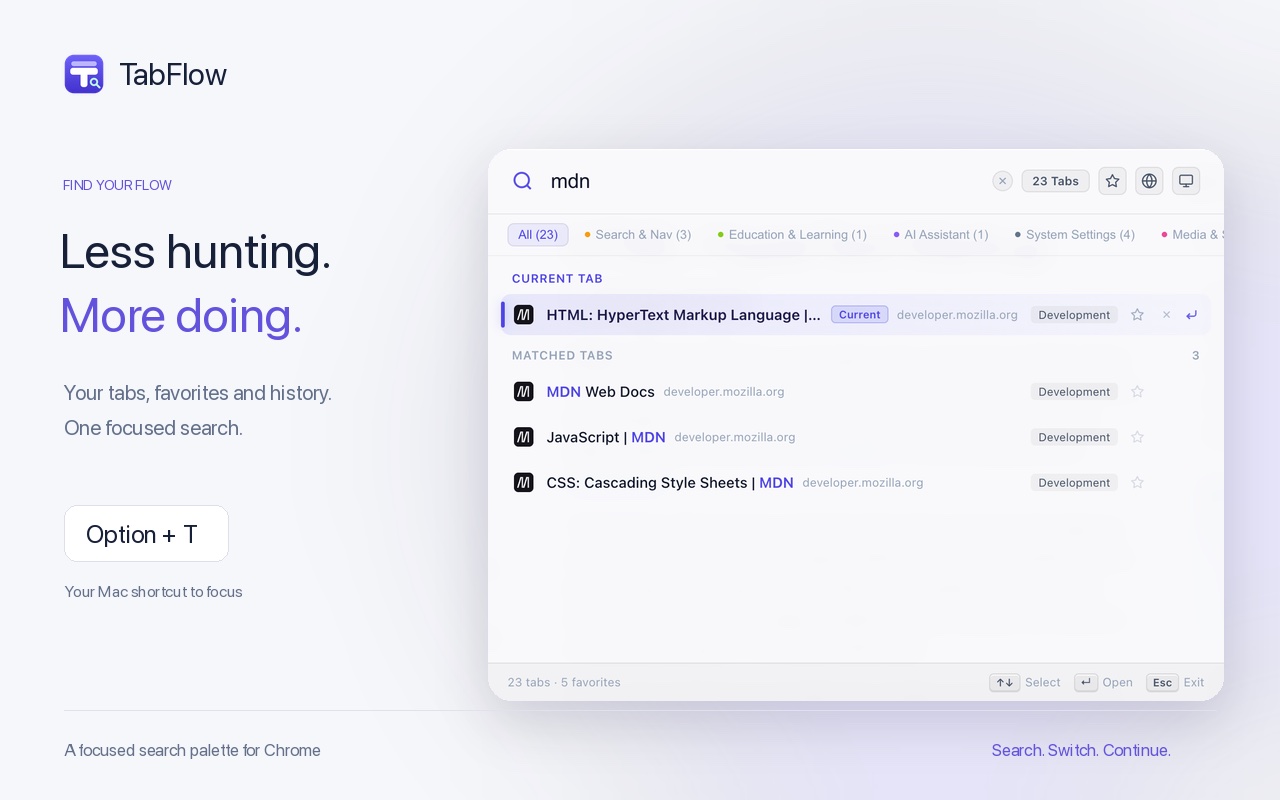
Built for speed, focus, and clarity
Designed following macOS Human Interface Guidelines. Clean, lightweight, and blazingly fast on both Chrome and Microsoft Edge.
Universal Tab Search
Search across every open window, saved favorites, and recent history. Fuzzy matching means you find what you need even with typos.
Keyboard-First Workflow
Press Option+T (or Alt+T). Use arrow keys to select, Enter to jump, and Esc to dismiss. Your hands never leave the keyboard.
Star Tabs & Free Memory
Star essential pages to keep them in favorites. Safely close heavy tabs to reclaim RAM, knowing you can restore them in an instant.
100% Private & Local
Everything runs on your machine. Zero tracking, zero telemetry scripts, zero data sent to external servers. Your browsing history is yours.
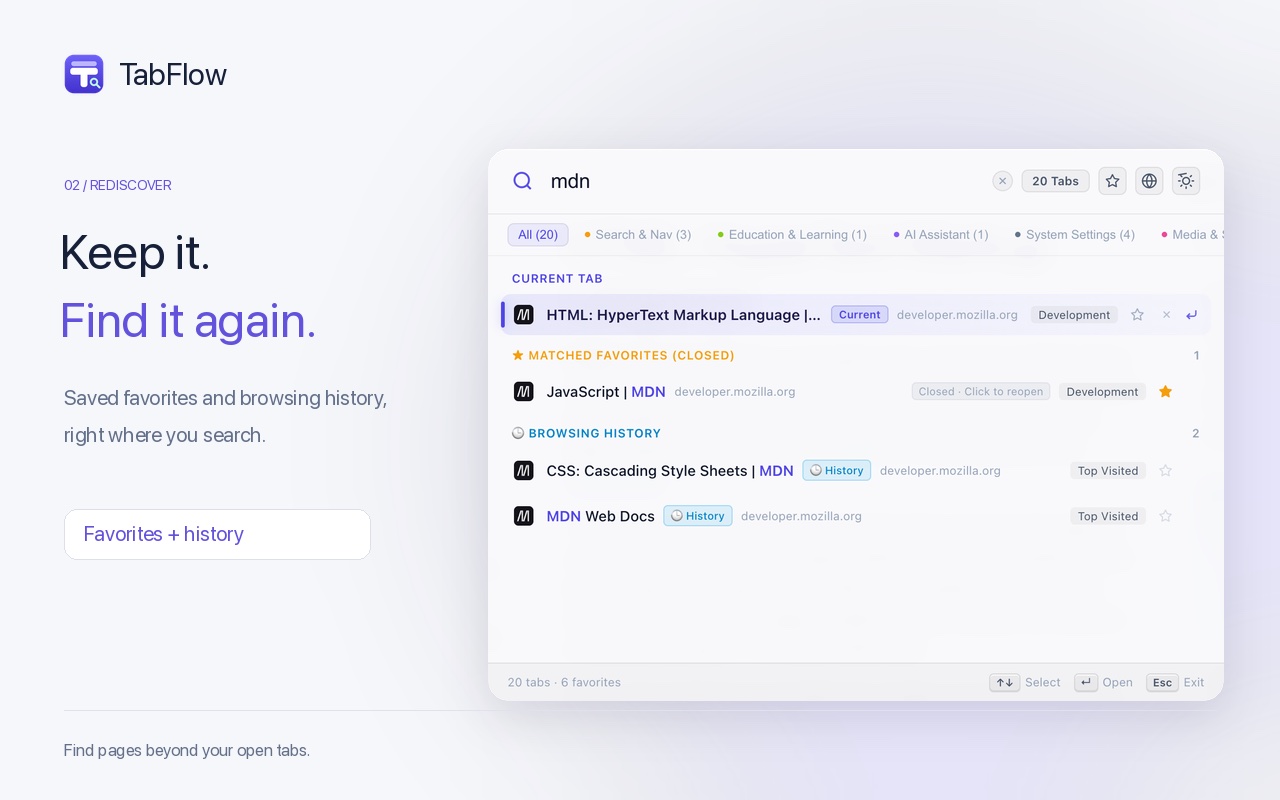
Rediscover your essential tabs in seconds
Stop hoarding hundreds of tabs in fear of losing them. TabFlow provides a dedicated favorites workspace to keep your browser tidy and fast.
- One-click star to save pages permanently
- Close tab groups safely and boost system speed
- Search browsing history alongside active tabs
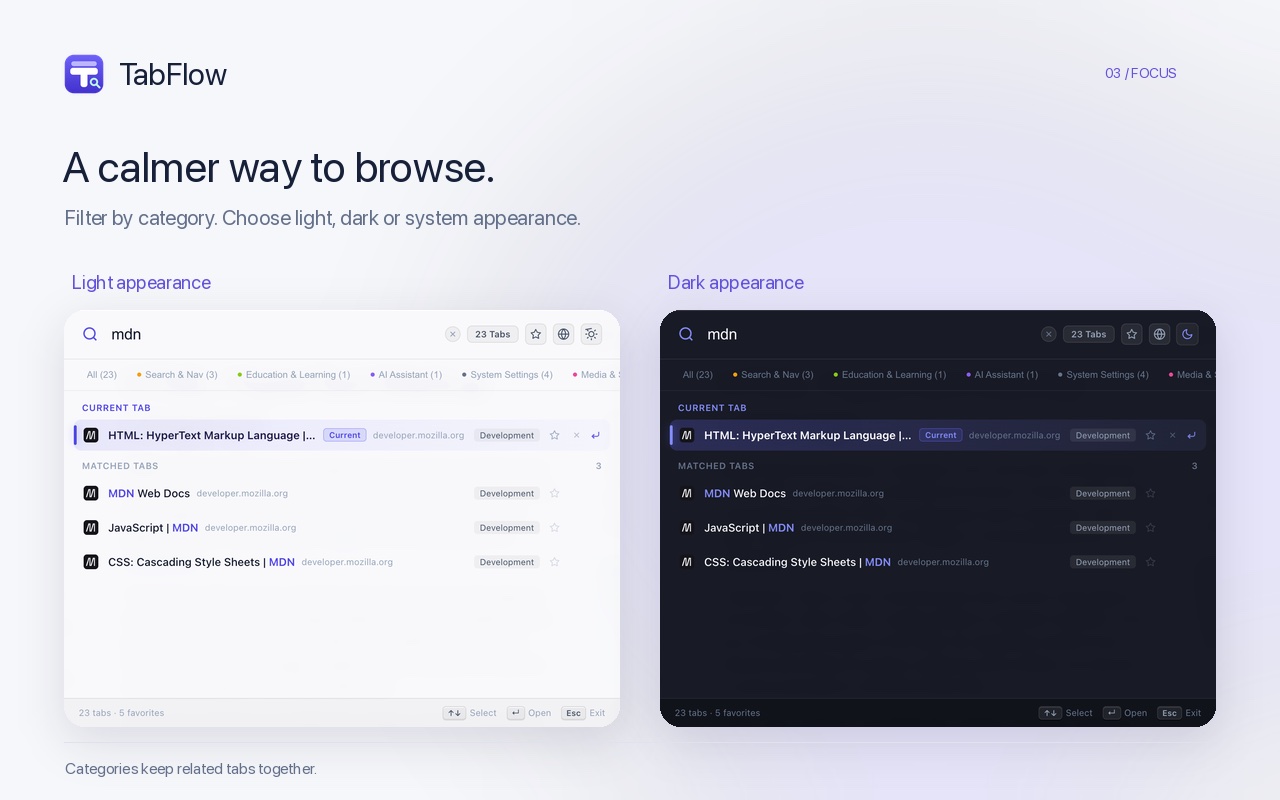
Native dark and light appearance
Crafted to blend seamlessly with macOS Sonoma, Sequoia, and Windows 11. Follow your system theme automatically or lock your favorite appearance.
- Dynamic auto-switching with system dark mode
- Subtle frosted glass textures and crisp typography
- High contrast ratios for optimal readability
Speed at your fingertips
Keep your hands on the keyboard and fly through your workflow.
Frequently Asked Questions
Everything you need to know about TabFlow, browser support, and privacy.
How do I open TabFlow?
Press Option+T on macOS or Alt+T on Windows. You can also click the TabFlow icon in your browser toolbar, or configure custom shortcuts at chrome://extensions/shortcuts or edge://extensions/shortcuts.
Does TabFlow support Microsoft Edge?
Yes, completely! TabFlow is built on the modern Chromium extension architecture and works natively on Microsoft Edge as well as Google Chrome, Brave, and other Chromium browsers. Edge users can install it directly with one click.
Is TabFlow free?
Yes, TabFlow is 100% free with no hidden charges, subscriptions, or locked features.
Is my browsing data private and safe?
Yes. Tab matching, history indexing, and favorite bookmarks are processed entirely within your local browser. There is no remote logging, tracking pixel, or advertising SDK.
Which browsers and operating systems are supported?
TabFlow is built on Manifest V3 and works on Chrome 114+ and Microsoft Edge 114+ across macOS, Windows, Linux, and ChromeOS, as well as Chromium-compatible browsers like Brave and Arc.
Ready to streamline your tabs in Chrome & Edge?
Install TabFlow today and experience lightning-fast tab switching across your browser windows.
任何一个标签页,
瞬时触达。
TabFlow 为 Chrome 与 Microsoft Edge 注入 macOS Spotlight 式极速体验。按下快捷键,即可在跨窗口标签、精选收藏与历史记录中快速穿梭,丝滑无阻。

专为专注与极速而生
严谨遵循 macOS 人机界面设计指南,克制优雅、秒级响应,彻底告别臃肿。
全局即搜即达
跨窗口秒级检索打开的标签页、收藏夹与历史记录。智能模糊拼音匹配,哪怕打错字母也能迅速找到。
纯键盘盲操流
Mac 按 Option+T,Windows 按 Alt+T。上下箭头选定,回车秒开,Esc 退出。双手不离键盘,打断感归零。
一键加星防误关
重要网页一键加星固定。随手关闭臃肿标签释放内存,无需担心丢失,随时在收藏库中瞬间找回。
100% 纯本地运行
所有索引与检索完全在浏览器本地执行。无数据上报接口、无第三方统计、无广告追踪,隐私安心无虞。
告别标签堆积,让浏览器重回轻盈
常常打开几十个标签舍不得关?给重要页面随手加星,立刻持久保留在专属收藏库中。你可以随时安心关闭冗余标签,释放海量系统内存。
- 一键加星,重要页面永不丢失
- 大胆关闭占用高内存的非活动标签
- 搜索栏同时支持检索历史记录与当前标签

深浅双色,浑然天成的系统级质感
完美契合 macOS 视觉规范,配备精致的浅色与深色双重主题。支持跟随系统外观自动切换,无论是清晨还是深夜,带来极度舒适的沉浸体验。
- 跟随系统深浅色模式无缝自适应
- 通透的毛玻璃材质与细腻的微边框高光
- 优化的字体层级与高对比度易读性

全键盘极客体验
无需伸手摸鼠标,指尖轻敲,直达所想。
常见问题
关于 TabFlow 的使用方式与数据隐私解答。
如何呼出 TabFlow?
在 macOS 上按 Option+T,在 Windows 上按 Alt+T;也可以直接点击浏览器工具栏里的 TabFlow 图标。如需修改热键,可随时在浏览器打开 chrome://extensions/shortcuts 或 edge://extensions/shortcuts 自定义。
TabFlow 支持 Microsoft Edge 浏览器吗?
全面支持!TabFlow 基于 Chromium 现代扩展架构开发,与 Microsoft Edge 及 Google Chrome 深度兼容。Edge 用户可直接一键添加到浏览器,与 Edge 自带的垂直标签页、工作区顺畅联动。
TabFlow 是免费的吗?
是的,TabFlow 完全免费使用,没有任何隐藏收费或付费墙。
我的浏览历史和数据安全吗?
完全安全。搜索索引、收藏夹与历史记录查询完全在你的本地浏览器沙箱中执行。我们没有部署任何远程上报服务器,亦无任何第三方统计分析 SDK。
支持哪些浏览器和操作系统?
TabFlow 基于 Manifest V3 开发,完美支持 Chrome 114+ 与 Microsoft Edge 114+,覆盖 macOS、Windows、Linux 系统,同时兼容 Brave、Arc 等基于 Chromium 的浏览器。
准备好在 Chrome 与 Edge 中找回整洁的标签页了吗?
任何一個分頁,
瞬時觸達。
TabFlow 為 Chrome 與 Microsoft Edge 注入 macOS Spotlight 式極速體驗。按下快速鍵,即可在跨視窗分頁、精選收藏與瀏覽紀錄中快速穿梭,絲滑無阻。
專為專注與極速而生
嚴謹遵循 macOS 人機介面設計指南,克制優雅、秒級響應,徹底告別臃腫。
全域即搜即達
跨視窗秒級檢索已開啟的分頁、收藏夾與瀏覽紀錄。智慧模糊比對,哪怕打錯字母也能迅速找到。
純鍵盤盲操流
Mac 按 Option+T,Windows 按 Alt+T。上下鍵選定,Enter 秒開,Esc 退出。雙手不離鍵盤,打斷感歸零。
一鍵加星防誤關
重要網頁一鍵加星固定。隨手關閉臃腫分頁釋放記憶體,無需擔心遺失,隨時在收藏庫中瞬間找回。
100% 純本機執行
所有索引與檢索完全在瀏覽器本機執行。無資料回報介面、無第三方統計、無廣告追蹤,隱私安心無虞。
告別分頁堆積,讓瀏覽器重回輕盈
常常打開幾十個分頁捨不得關?給重要頁面隨手加星,立刻持久保留在專屬收藏庫中。你可以隨時安心關閉冗餘分頁,釋放海量系統記憶體。
- 一鍵加星,重要頁面永不遺失
- 放心關閉分頁釋放記憶體,需要時隨時呼出
- 瀏覽紀錄與目前分頁融合搜尋,無需翻查繁瑣選單
原生質感,深淺隨心
精心調校的毛玻璃半透明質感與原生 macOS 配色,無縫融入你的桌面工作流。提供深淺色自選或跟隨系統,更有 10 種語言開箱即用。
- 自動跟隨系統外觀智慧切換深色/淺色模式
- 提供英語、繁體中文、簡體中文等多語系支援
- 極低記憶體佔用,幾乎不消耗背景資源
讓鍵盤成為你的第一延伸
記住這幾個按鍵,開啟極速分頁搜尋新紀元。
chrome://extensions/shortcuts
常見問題解答
解答你關於 TabFlow 分頁搜尋與隱私安全的一切疑問。
TabFlow 是免費的嗎?
是的,TabFlow 完全免費使用,沒有任何隱藏收費或付費牆。
我的瀏覽紀錄和資料安全嗎?
完全安全。搜尋索引、收藏夾與瀏覽紀錄查詢完全在你的本機瀏覽器沙箱中執行。我們沒有部署任何遠端回報伺服器,亦無任何第三方統計分析 SDK。
支援哪些瀏覽器和作業系統?
TabFlow 基於 Manifest V3 開發,完美支援 Chrome 114+ 與 Microsoft Edge 114+,覆蓋 macOS、Windows、Linux 系統,同時相容 Brave、Arc 等基於 Chromium 的瀏覽器。